Engineering Case Study
Hypertask AI Chat Architecture.
Building a streaming AI assistant with tool calling, hybrid knowledge retrieval, and contextual project awareness.
Features | Streaming AI Chat, Tool Calling, RAG Retrieval
Role | AI Engineer / Backend Engineer
Stack | FastAPI, LangGraph, LangChain, Pinecone, Redis
The Challenge
Modern teams need an AI assistant that goes beyond simple Q&A.
- Teams need AI that can:
- Understand project context
- Retrieve internal documentation
- Access external information
- Interact with tasks and projects
- Teams need AI that can:
- Maintaining conversation context across sessions
- Enabling tool usage by the AI autonomously
- Retrieving accurate knowledge from multiple sources
- Streaming responses live to the user interface
AI-Powered Workspace Intelligence
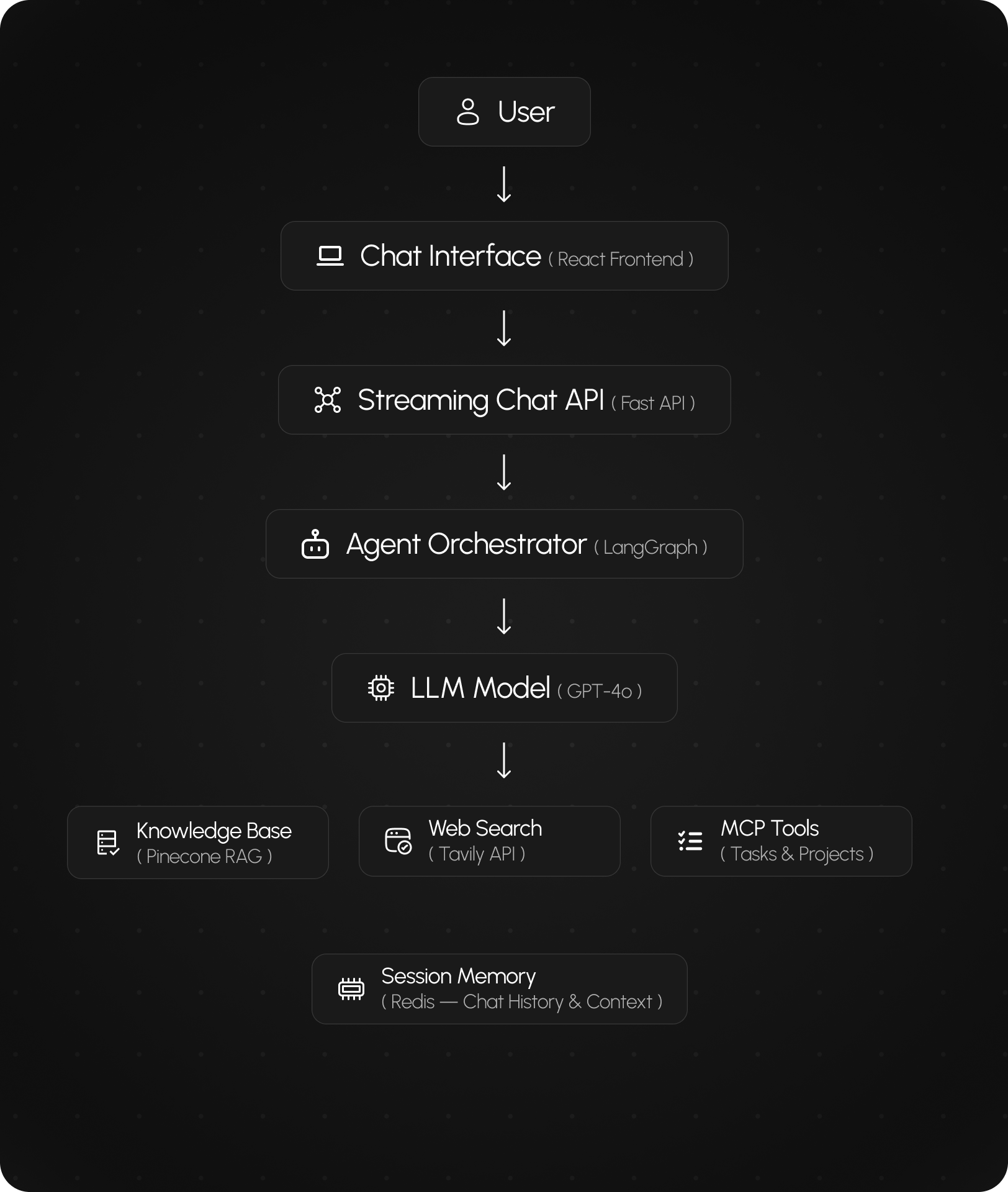
Hypertask AI Chat connects language models with tools, knowledge retrieval, and project context — enabling teams to interact with their tasks, documentation, and workflows through AI.
- AI-Powered Workspace Intelligence
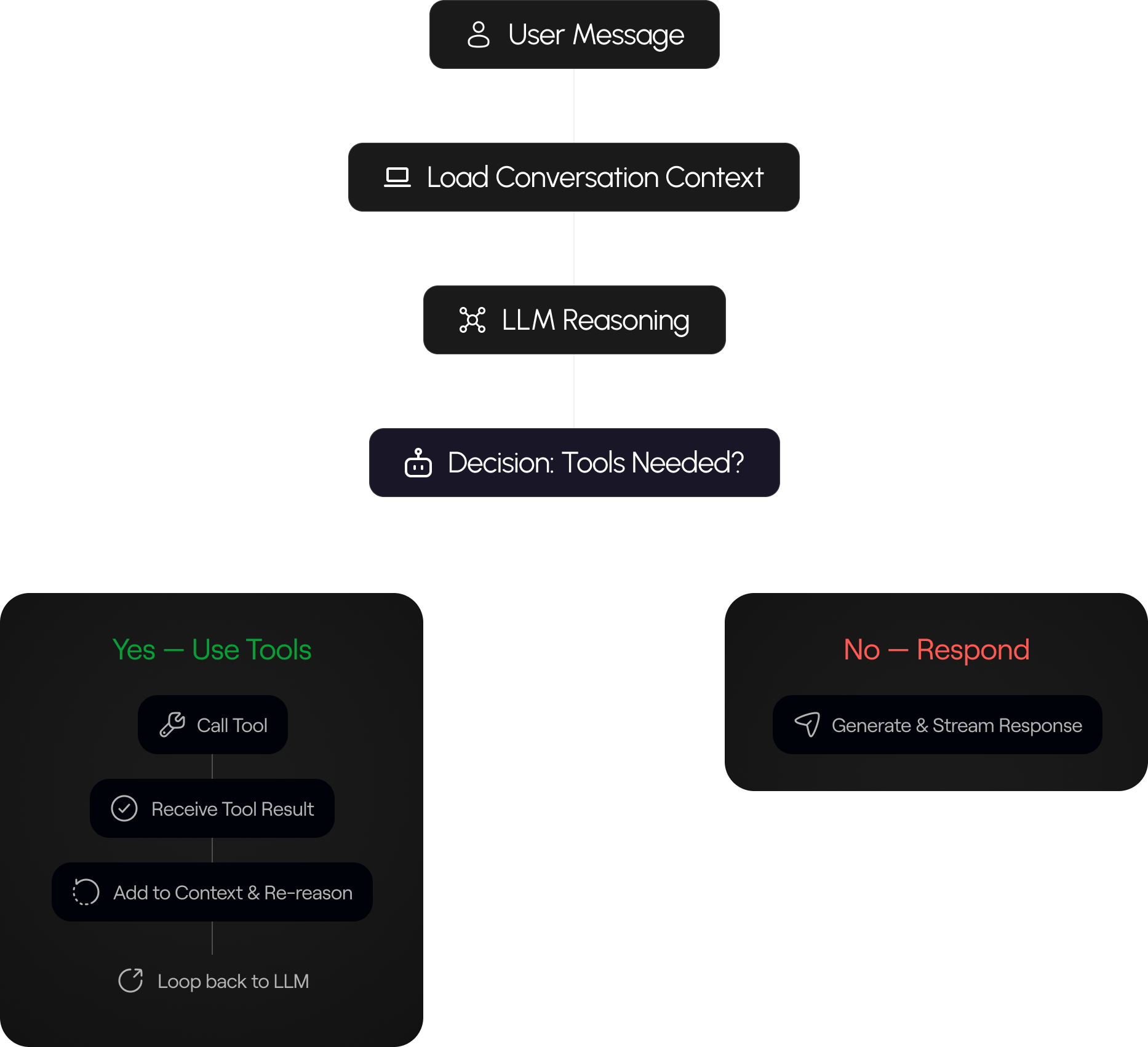
The AI assistant runs an agent workflow that can reason, call tools, and generate responses based on the current conversation and project context. The model can retrieve information, interact with Hypertask tools, and continue reasoning until it produces a final answer.
- Context-Aware Retrieval
The system dynamically scopes retrieval using metadata such as projectId and taskId.
This ensures that answers are generated using the correct project or task context instead of unrelated documents.
- Hybrid Knowledge Retrieval
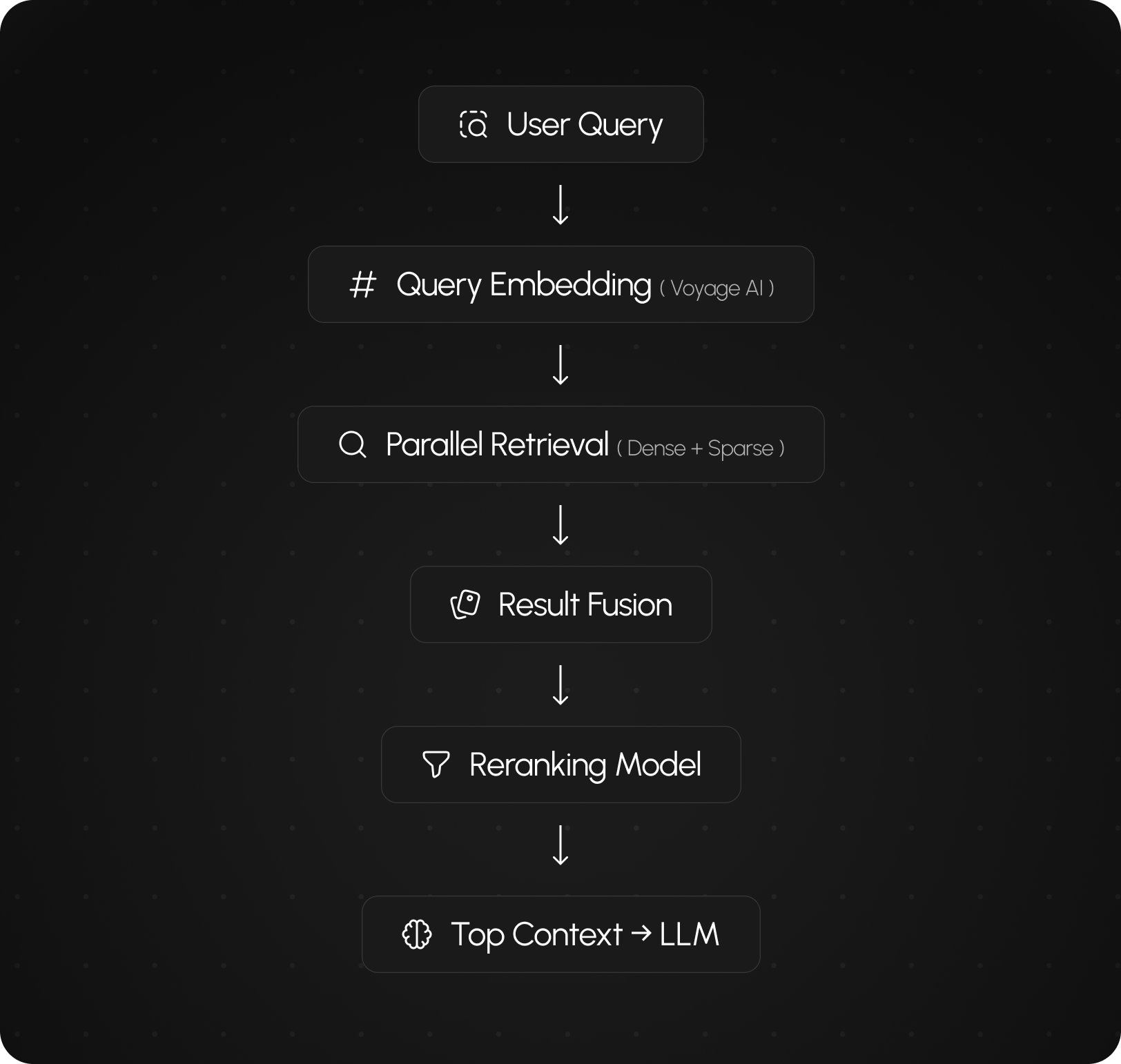
Knowledge-base retrieval combines semantic search with keyword-based search to return highly relevant information.
Dense vector search and sparse keyword search run in parallel and the results are fused and reranked to improve response quality.
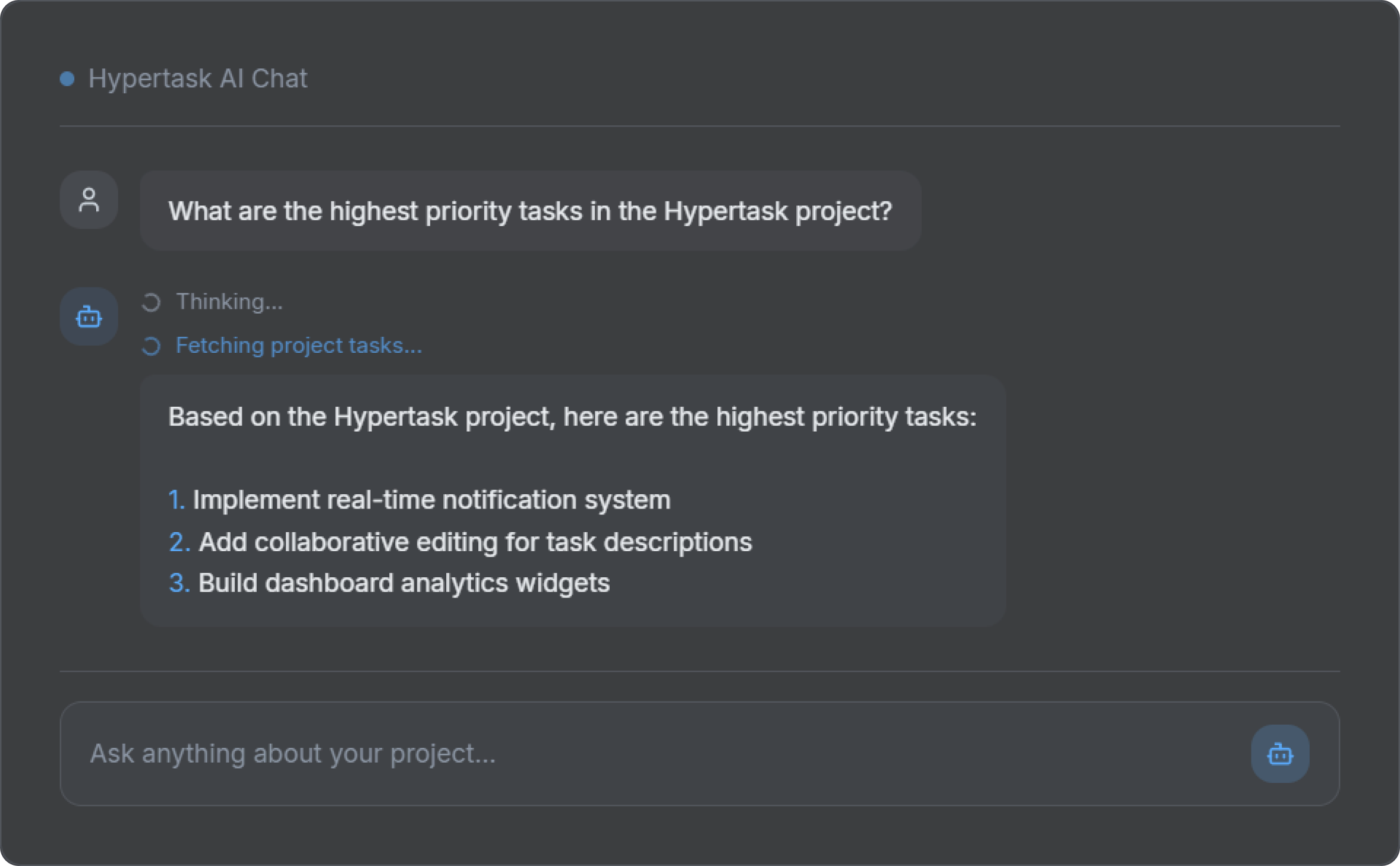
- Streaming AI Responses
Responses are delivered as a live stream so users see progress while the answer is generated.
Status updates such as “Thinking…” or “Fetching information…” appear first, followed by the response text in chunks.
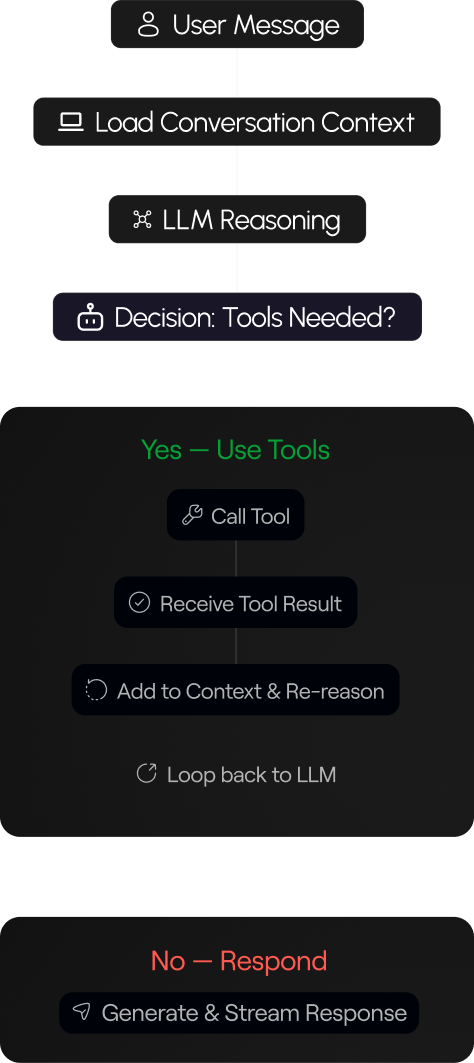
How the AI Agent Works
A reasoning loop that decides when to use tools and when to respond.
AI Tool System
Three tool categories that give the AI real-world capabilities.
- Knowledge Base Tool (RAG)
Retrieves internal documents using a vector database. Combines dense and sparse search with reranking for high-accuracy results.
- Web Search Tool
Retrieves live information from the internet using Tavily API, enabling the AI to answer questions about current events and external data.
- MCP Tools
Allows the AI to interact directly with Hypertask tasks and projects — creating, updating, and querying project data in real time.
Hybrid Knowledge Retrieval
A multi-stage pipeline combining dense vector search with sparse keyword matching.
- Dense Vector Search
Semantic similarity search using Voyage embeddings stored in Pinecone. Captures meaning and intent.
- Sparse Keyword Search
BM25-style keyword matching for precise term lookups. Complements semantic search for higher recall.
Conversation Memory
Redis-backed session management for persistent, context-aware conversations.
- Session ID
Each conversation is tied to a unique session ID, enabling isolated and retrievable chat histories.
- Chat History
Full message history is stored in Redis, letting the AI reference earlier messages for follow-up questions.
- Context Window
Recent messages are prioritized to fit the LLM context window, maintaining relevance without overloading.
Real-Time AI Responses
Token-by-token streaming delivers a natural, responsive chat experience.
Additional Features
Three tool categories that give the AI real-world capabilities.
- Time Awareness
The AI knows the current date and time, enabling time-sensitive queries and scheduling context.
- HTML Formatted Responses
Responses are formatted with HTML for rich display in the UI — including lists, code blocks, and emphasis.
- Context Prioritization
Recent conversation turns are weighted higher, ensuring the most relevant context informs each response.
System Summary
The Hypertask AI Chat system combines streaming APIs, an agent-based workflow, hybrid knowledge retrieval, and tool integration to create a contextual AI assistant capable of interacting with internal knowledge and product functionality.
Case Studies.
Hey
Ya’ll!
What Are We Shaping Today?